 Online Keyboard Synth
How to Play Piano on Your Computer Keyboard
Yes — your typing keyboard is already a two-octave piano. The letters are printed on the keys below: press Z for C and follow the alphabet. No download, no account, no instrument to buy.
Press the letters shown on the keys, or click to play.or hold Space
built by Milo Kessler
Yes, You Can Play Piano on a Computer Keyboard
The fast answer: a computer keyboard piano is a real thing, it costs nothing, and the one above this paragraph is already loaded. Every virtual piano and every music-production app solves the same puzzle — a typing keyboard has no black keys — by laying piano notes across the letter rows. Learn that mapping once and you can pick out melodies, practice scales, and play three-chord songs today.
The honest answer has a second half, and this page won't skip it: a computer keyboard teaches you music — notes, scales, chords, rhythm, your ear — but it cannot teach piano touch, because the keys have no weight and no loud-soft sensitivity. Used deliberately, it's the cheapest possible on-ramp to the real instrument.
What You'll Learn
- How letter keys map to piano notes — on this site and everywhere else
- What the Web Audio oscillators, filters, and envelopes under the hood do
- Which piano skills transfer from QWERTY practice — and which honestly don't
- A 7-day starter path: notes → scales → three-chord songs → your first recording
- How to read and write letter-based sheet notation
- When a budget MIDI controller is worth it, and exactly what to look for
- The six mistakes that stall most computer-keyboard beginners
How Letter Keys Map to Piano Notes
A piano repeats the same 12 notes up its length: seven white keys (the natural notes A through G) and five black keys grouped in alternating twos and threes. That grouping is your landmark — C always sits immediately left of a group of two black keys. This site's mapping puts one continuous octave on each of two rows, with the black keys on the keys that sit between the white-key letters:
| Piano keys | Notes | Computer keys |
|---|---|---|
| Lower white keys | C D E F G A B | Z X C V B N M |
| Lower black keys | C# D# — F# G# A# | S D G H J |
| Upper white keys | C D E F G A B C | Q W E R T Y U I |
| Upper black keys | C# D# — F# G# A# | 2 3 5 6 7 |
| Sustain | — | Hold Space |
Two details make it click. First, the gaps: just as a real piano has no black key between E–F and B–C, there's no shortcut betweenD–G and J–M either — the 2-and-3 grouping survives in your fingers. Second, Z is your anchor C, which means the C major scale is literally the bottom row:Z X C V B N M. The Lower and Higher buttons above the piano shift the whole window by octave — the same trick every virtual piano uses, since no typing keyboard can show 88 keys at once.
Bottom line: Z is C, the bottom row is the C major scale, and the black keys sit between the white-key letters. Learn that once and the labels printed on the keys handle the rest.
Other mappings you'll meet elsewhere
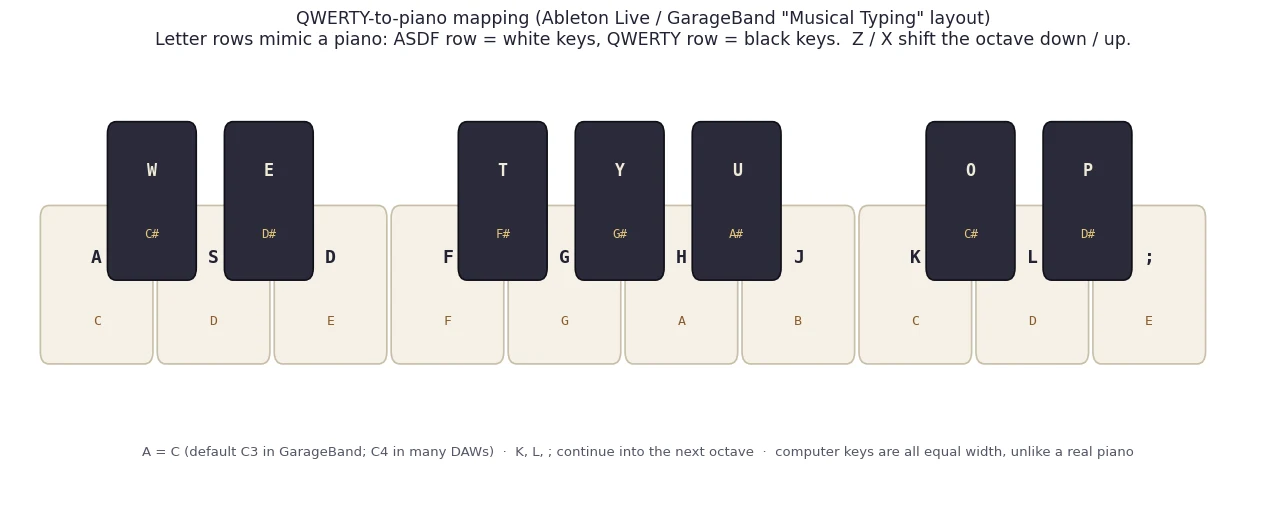
This two-row layout is one of three conventions in the wild. Music software like Ableton Live and GarageBand's "Musical Typing" starts on the middle row instead — A is C, theA S D F G H J home row is the C major scale, andZ/X shift octaves:
| Piano key | Note | Computer key | Piano key | Note | Computer key |
|---|---|---|---|---|---|
| White | C | A | Black | C# | W |
| White | D | S | Black | D# | E |
| White | E | D | — | — | — |
| White | F | F | Black | F# | T |
| White | G | G | Black | G# | Y |
| White | A | H | Black | A# | U |
| White | B | J | — | — | — |
| White | C (next octave) | K | Black | C# | O |
| White | D | L | Black | D# | P |
| White | E | ; | — | — | — |
The third convention, popularized by VirtualPiano.net's huge library of letter-based sheet music, lays the keyboard out as one long ribbon: white keys run in reading order from 1 through macross roughly five octaves, and shifted characters stand in for black keys. That convention also produced a notation you can read in seconds — letters in sequence play one after another, letters in square brackets are pressed together as a chord, dashes are rests — and it works for this site's rows too:
# Letter-sheet notation — write your own
Melody:  Z Z B B N N B - V V C C X X Z    one letter = one note
Chords:  [ZCB] [VNQ] [BMW]                [brackets] = press together
Rest:    -                                dash = wait one beat
Yours:   [your letters here]
Bottom line: all three conventions encode the same 12-note pattern. Pick whichever one is in front of you, find its C anchor first, and the rest is a five-minute adjustment.
What a Browser Piano Is Actually Built On
Every in-browser piano you've ever used runs on theWeb Audio API, a sound engine built into the browser itself. When you pressZ on the synth above, three building blocks fire in a chain: an oscillator generates the raw tone (sine, triangle, square, or sawtooth — try the waveform buttons), a filtersculpts it brighter or darker, and a volume envelopeshapes each note over time. That envelope — attack, decay, sustain, release, or ADSR — is what separates an instrument from a doorbell: a fast attack starts the note crisply, and a long release lets it ring after you let go, the way a piano string does.
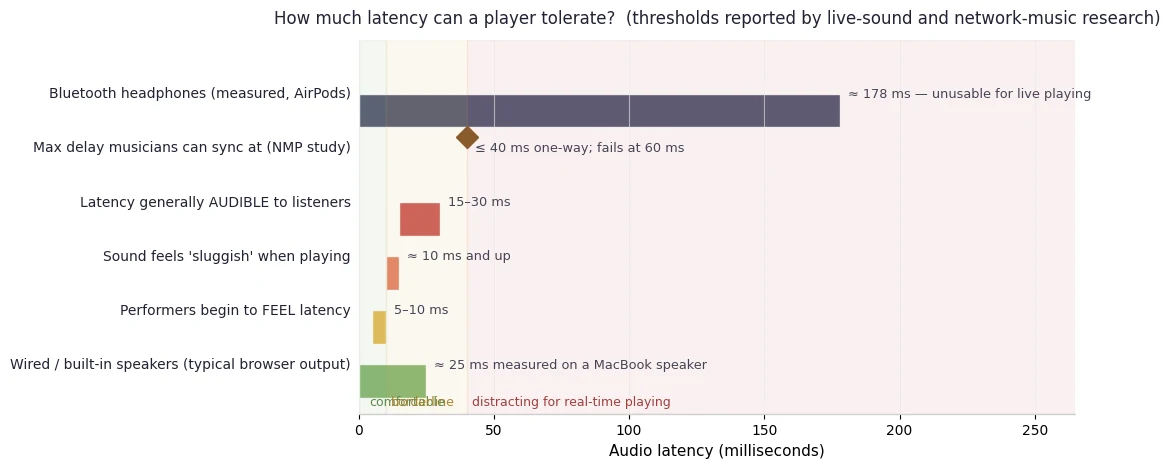
Latency — the gap between pressing a key and hearing it — decides whether a browser piano feels like an instrument. Live-sound experience suggests performers begin to feel delay at roughly 5–10 ms and clearly hear it by about 15–30 ms. The good news: a modern laptop playing through built-in speakers or wired headphones lands in playable territory. The bad news is Bluetooth:
Polyphony — how many notes can sound at once — is effectively unlimited in the Web Audio engine; the real ceiling is your keyboard's rollover limit, which is why dense chords sometimes drop a note (see the FAQ). And when you're ready for real keys, theWeb MIDI APIlets a USB MIDI keyboard drive this same page — supported in Chrome, Edge, and Firefox, not yet in Safari (checkcaniuse.comfor the current picture). Ouronline MIDI synthesizerpage has the full setup walkthrough.
Does It Transfer to a Real Piano? Honestly, Half of It Does
Music educators draw a clean line between musical knowledge andinstrument technique. The knowledge side is fully portable —School of Rocknotes that songs learned on one keyboard layout transfer directly to any other, because the note patterns are identical. The technique side is not: one teaching studio compares training only on weightless keys to training for a marathon on a trampoline — real fitness, wrong surface. Here's the honest ledger:
| Skill | Transfers from QWERTY practice? |
|---|---|
| Note names and keyboard geography | Yes — the C-left-of-two-black-keys landmark is identical everywhere |
| Scales and key signatures | Yes — a C major scale teaches the same pitch pattern on any layout |
| Ear training (intervals, chords, melody direction) | Yes — pitch relationships are layout-independent |
| Chord shapes as note sets | Mostly — C–E–G is a major triad wherever you play it; the fingering won't transfer |
| Rhythm and steady tempo | Yes — metronome discipline transfers fully |
| Touch and dynamics (playing loud and soft) | No — every letter key strikes at the same force |
| Finger independence and evenness | No — requires practicing against key resistance |
| Hand posture, finger numbers, arm weight | No — typing geometry encourages flat, typing-style hands |
| Two-hand independence | Barely — both hands share one cramped grid |
Bottom line: a computer keyboard can teach you music; it cannot teach you piano — and confusing those two promises is where disappointment comes from. It's the zero-cost way to find out whether piano holds your interest before the first real purchase, and the rhythm and ear skills you build are never wasted.
Ready to try the mapping? Thefree online keyboard synthesizeris one click away — Z X C V B N M is a C major scale the moment the page loads.
A 7-Day Starter Path (About Ten Minutes a Day)
Short, frequent sessions beat weekend marathons — ten focused minutes daily will take you further than an hour of noodling. Here's the exact first week we'd hand a curious friend, all on the synth above:
- Day 1 — Find the notes · Time: ~10 min. Turn on Note names, find Z (your anchor C), then find every other C using the Lower and Higher buttons, saying each aloud. Finish with call-and-response: play a note, look away, name it relative to C.
- Day 2 — The C major scale · Time: ~10 min. PlayZ X C V B N M Q up and down, slowly and evenly, naming notes as you go. Evenness is the whole goal — every note the same length.
- Day 3 — Add black keys · Time: ~12 min. Learn G major (B N M Q W E 5 T — the 5 is F#) and A minor (N M Q W E R T Y). Reaching for a black key mid-phrase is the mapping's main finger-twister, so go slower than feels necessary.
- Day 4 — Three chords · Time: ~12 min. Most simple songs ride the I–IV–V progression. In C: C major (Z + C + B), F major (V + N + Q), G major (B + M + W). Press each as a block until the shapes feel familiar, then loop the transitions C→F, C→G, F→G. If a chord drops a note, that's keyboard rollover — release the sustain key first.
- Day 5 — A real song · Time: ~10 min. "Twinkle Twinkle" in C isZ Z B B N N B — V V C C X X Z; "Mary Had a Little Lamb" starts C X Z X C C C. Playing something recognizable in week one is what carries you to week four.
- Day 6 — Metronome day · Time: ~10 min. Open any metronome, set 60 BPM, and play your scale one note per click. When it's perfect three times, raise the tempo 2–4 BPM; when errors return, drop back. Never practice faster than you can play correctly — speed before accuracy just rehearses mistakes.
- Day 7 — Record and listen · Time: ~12 min. Hit Record on the synth, play your best take of the scale and one song, then listen like a stranger would. Hearing yourself is the fastest way to pick what week two should fix.
When to Upgrade to a Budget MIDI Controller
The signals are easy to recognize: you're fighting the octave-shift buttons mid-song, chords drop notes to rollover, you catch yourself wanting to play one note louder than another — or you've simply decided piano is sticking. When that moment comes, here's what matters, in priority order:
- Velocity-sensitive keys — non-negotiable. Without them you still can't play loud and soft, which is the main thing QWERTY can't teach.
- Full-size keys. They preserve the spacing your hands will meet on any real piano; mini keys are portable but cramped for piano ambitions.
- Key count. 25 keys suits one-handed melodies, 32–37 reduces octave-button gymnastics, and 49 full-size keys makes genuine two-handed playing practical.
- Class-compliant USB. Plug-and-play with any computer — and with this site via Web MIDI in Chrome or Edge, no drivers or new software.
- A sustain-pedal input is the tie-breaker worth paying a little extra for.
Keep two purchase tiers separate. A MIDI controllermakes no sound by itself — it's a silent keyboard that talks to your computer, which keeps prices low (capable velocity-sensitive options start well under $100, mini-key models under $50) and plugs straight into the browser-based routine you already have. A digital piano costs more but adds speakers, piano sounds, and at the serious end fully weighted hammer-action keys — which teachers consistently recommend once classical technique is the goal, because finger strength and dynamic control are built against resistance. A sensible ladder: QWERTY free → velocity-sensitive controller → 49 full-size keys → 88 weighted keys when technique becomes the point. Theonline MIDI synthesizerpage picks up the moment you plug one in.
Common Mistakes (and Their Fixes)
- "The song sheet is wrong." Usually the octave window moved — you brushed Lower or Higher. Play Z X C V B N M once before any song to confirm where C lives.
- Practicing over Bluetooth headphones. The ~178 ms delay makes everything feel rubbery and quietly trains bad timing. Use wired headphones or speakers.
- Blaming the site for missing chord notes. That's your keyboard's rollover limit. Keep chords to three or four notes and release held keys before big grips.
- Starting the metronome too fast. Begin where you can play perfectly — often 60 BPM — and climb in 2–4 BPM steps. Speed before accuracy rehearses errors into muscle memory.
- Expecting QWERTY to teach touch. It can't. Use it for notes, chords, ear, and rhythm — and plan the move to velocity-sensitive keys once piano sticks.
- Hour-long noodling sessions. Ten focused minutes with one goal per day beats an aimless hour, every week of the year.
Last verified: 2026-09-14 — key mappings and shortcuts checked against the live tool on this page.
Frequently asked questions
Can you really learn piano on a computer keyboard?
You can learn music, not piano technique. Note names, scales, chords, ear training, and steady rhythm all transfer fully to a real piano, because the pitch patterns are identical. Touch, dynamics, finger independence, and hand posture do not — those need weighted, velocity-sensitive keys. Treat the computer keyboard as the free classroom for the theory-and-ear phase.
Can a computer keyboard replace piano lessons or a real piano?
No. It replaces the cost of finding out whether piano interests you — notes, scales, chords, and rhythm are all learnable here. It cannot replace a teacher's feedback on posture and fingering, or the weighted keys that build touch and dynamics. Think of it as the free first month, not the whole journey.
Which letter keys are which piano notes on this page?
Z is C, and the bottom row Z X C V B N M climbs the white keys C D E F G A B, with S D G H J as the black keys between them. The top row Q W E R T Y U I repeats the pattern one octave up, with 2 3 5 6 7 as black keys. The letters are printed on the on-screen keys, and Lower / Higher shift the whole range.
Why is the synth silent until I click or press a key?
That is your browser's autoplay policy, not a bug. Browsers keep the Web Audio engine suspended until you interact with the page, so no website can blast sound uninvited. Your first click or key press wakes the audio engine; from then on every note plays instantly.
Does this synth sound like a real acoustic piano?
No — this is a synthesizer, not a sampled grand piano. The Electric Piano and Glass Keys presets get you into a piano-like neighborhood, and for learning note positions and chords the timbre matters far less than the pitch. If an authentic piano sound is the priority, a sampled-piano app or a digital piano is the honest tool for that job.
Why do some chord notes go missing when I press many keys at once?
That is a hardware limit of typing keyboards called key rollover. Most keyboards scan keys through a shared electrical matrix and can only report a handful of simultaneous presses — cheap ones as few as two or three. When you exceed the limit, extra notes are silently dropped. It is not the synth failing; a three-note chord plus a held sustain key can already exceed a bargain laptop's reliable limit.
Why does the sound lag when I use Bluetooth headphones?
Bluetooth audio adds a large output delay — around 178 ms has been measured on wireless earbuds, versus roughly 25 ms on built-in laptop speakers. For playing, use wired headphones or speakers; the difference between a rubbery toy feel and an instrument feel is mostly that one cable.
Does this work on a phone or tablet?
Yes — on touch screens you play by tapping the on-screen keys, using Lower and Higher for more range. The letter-key mapping described on this page needs a physical keyboard, so the full computer-keyboard piano experience is best on a laptop or desktop.
Can I plug in a real MIDI keyboard instead?
Yes. In Chrome or Edge, connect any class-compliant USB MIDI keyboard and this synth detects it automatically, with velocity and sustain pedal support. Safari does not support Web MIDI yet, so there the computer keyboard and touch keys remain the way in. See the MIDI setup guide
Will practicing on a computer keyboard ruin my real-piano technique?
Not in the exploratory phase — the first weeks of piano are about finding notes, reading, and keeping time, and for that an imperfect instrument beats no instrument. Teachers do warn that months of exclusive practice on weightless keys builds flat-fingered habits that take effort to unlearn, so once you know piano is sticking, move to velocity-sensitive keys within the first month or two of serious study.
How long until I can play an actual song?
With ten focused minutes a day, most beginners play a recognizable melody like Twinkle Twinkle in the first two or three days, and a three-chord song loop within the first week. The 7-day starter path on this page is built around exactly that timeline.
Start Playing in the Next Ten Seconds
On a computer? Play right now.
- Letters printed on every key — Z is C
- Two octaves, sustain, and note-name labels
- Free forever: no sign-up, no download
On a phone or tablet? Same deal.
- Tap the on-screen keys — no app to install
- Same sounds, presets, and recorder
- Still no account, no email, no trial
Related Pages
- Free Online Keyboard Synthesizer — the full instrument, with sound-design lessons and a built-in recorder.
- Best Free Online Synthesizer — everything you get for free, and how it compares to paid software.
- Online MIDI Synthesizer — connect a USB MIDI keyboard in the browser, with low-latency tips.